

Your 55-inch TV looks great but lacks the smarts of modern streaming devices. While new smart TVs cost $800-2,000+, the Roku Streaming Stick Plus offers a compelling alternative for around $40.
What Is the Roku Streaming Stick Plus?
The Roku Streaming Stick Plus is a compact HDMI device that transforms any TV into a streaming powerhouse. Think of it as your TV’s brain upgrade.
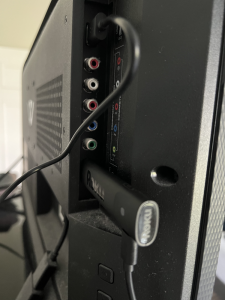
What’s included:
- HDMI streaming stick
- Voice remote with TV controls
- USB power cable
- Missing: USB wall adapter (you’ll need to buy one for ~$10 if your TV lacks USB ports)
Key capabilities:
- 4K HDR streaming from major services
- Voice remote controls TV power and volume
- Live TV channels with no subscriptions required
- Powers directly from TV’s USB port
The setup experience is notably smoother than Fire TV, with automatic TV detection through HDMI and a cleaner interface without constant ads.
Smart Home Integration: Your TV as Control Center
Beyond streaming, the Roku Stick serves as your smart home dashboard. Your TV becomes the control center for connected devices throughout your house.
Smart home features:
- Control Roku smart bulbs directly from TV
- View security camera feeds on the big screen
- Voice commands through Roku remote or mobile app
- Compatible with Alexa and Google Assistant
Voice control works through Roku’s built-in system or by integrating with existing smart assistants. Say “Hey Roku, dim the living room lights” and it responds instantly.
Pro tip: Roku’s smart home devices focus on essential functions rather than complex features—perfect for most users who primarily need basic lighting control and camera monitoring.
Learn more about the complete Roku Smart Home ecosystem and how all the pieces work together.
Setup: Simple and Quick
Setup takes about 10 minutes with minimal technical knowledge required.
Process:
- Plug stick into HDMI port
- Connect USB cable to TV (or wall adapter)
- Follow on-screen Wi-Fi setup
- Create free Roku account
- Add streaming services via mobile app
Smart setup feature: Select your preferred services on your phone, and they install automatically on the stick. Much easier than typing with a remote.
Technical Requirements
Wi-Fi requirements:
- 🌐 Dual-band Wi-Fi recommended for 4K streaming
- ⚡ Minimum 25 Mbps for 4K HDR content
- 📡 2.4GHz network sufficient for HD streaming
Potential setup issues:
- ⚠️ Older TVs may lack USB ports (need separate adapter)
- 🐌 Slow Wi-Fi affects 4K streaming quality
- 🔌 Some TV HDMI ports are difficult to access
Live TV: The Standout Feature
Live TV functionality works immediately after setup without additional subscriptions—a significant advantage for cord-cutters.
Available content:
- 📺 Local broadcast networks (ABC, CBS, NBC, FOX)
- 📰 News and weather channels
- 🆓 Free streaming content
Why this matters: Finding local news is particularly easy compared to Fire TV’s cluttered interface. This feature alone justifies the cost for many users who miss local content after cutting cable.
Roku vs. Smart TV: The Value Proposition
Smart TVs have inherent limitations that streaming sticks avoid:
Smart TV drawbacks:
- Built-in platforms slow over time
- Limited app selection varies by brand
- No upgrade path when technology advances
- Interface often cluttered with ads
Roku Stick advantages:
- Consistent performance through regular updates
- Extensive channel selection (5,000+ options)
- Easy upgrades—simply replace when needed
- Clean, ad-free browsing experience
Roku vs. Fire TV Stick: How They Compare
Roku Advantages:
- ✅ Cleaner interface without Amazon-focused promotions
- 📺 Better local news channel discovery
- 🎯 More neutral platform (no ecosystem bias)
- 🏠 Stronger smart home dashboard integration
Fire TV Stick Advantages:
- 🛒 Better Amazon Prime Video integration
- 🎮 More advanced gaming capabilities
- 💰 Lower entry-level pricing options
- 🎤 Enhanced voice control with Alexa ecosystem
Price Comparison:
| Device | Price | Key Feature |
| Roku Streaming Stick Plus | ~$40 | Local TV focus |
| Fire TV Stick 4K | ~$50 | Amazon integration |
Bottom line: Both handle 4K HDR streaming well. Choose Roku for cleaner browsing and local content discovery, or Fire TV for Amazon service integration and advanced features.
Compare with our detailed Fire TV Stick guide to see which fits your needs.
Is It Worth It in 2025?
The Roku Streaming Stick Plus remains relevant despite the prevalence of smart TVs. The combination of Live TV access, clean interface, and smart home integration provides genuine value.
✅ Best for:
Anyone wanting to upgrade their current TV’s capabilities without major expense, especially cord-cutters who miss local news access.
❌ Consider alternatives if:
You already have a recent smart TV with good performance, or you need advanced smart home features beyond basic control.
⚠️ Minor drawbacks:
Missing USB adapter in box, potential performance degradation over time, and limited advanced features compared to premium smart home systems.
Final verdict: The Roku ecosystem offers room for expansion, but the streaming stick delivers solid value as a standalone device. For ~$40, it’s an affordable way to modernize any TV while gaining access to comprehensive streaming and basic smart home control.