

After years of relying on basic Kidde smoke detectors, I finally decided to see what a smart model could do. My old alarms worked fine for the bare minimum. Loud beeps and a flashing light when something was wrong, and that was about it. No helpful alerts, no easy testing, and no guidance if you were trying to figure out what set them off.
I installed the First Alert SC5 Smoke & Carbon Monoxide Alarm (on Amazon) in my kitchen. That way, when food gets burned (which totally never happens) I get a more reasonable warning. Instead of the entire house beeping in unison with the dog adding his own howls, the SC5 gives a clear voice alert that actually tells me what is happening.

When I decided to try a smart smoke alarm out, I was curious if a “smart” detector could actually improve the situation. Spoiler alert: it did. Not only is it smarter about when to sound off, but the entire setup process was easier than expected.
First Impressions: Build, Features, and Design
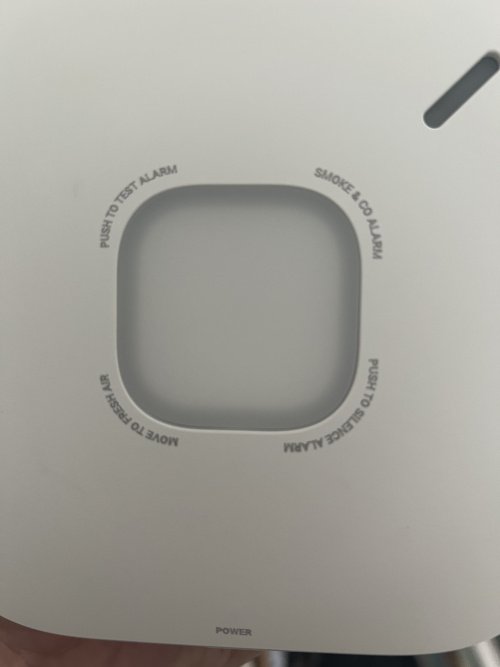
The SC5 immediately feels like a higher-quality device than the basic alarms I have used in the past. It is heavier, the housing feels solid, and the wiring connectors are sturdy enough to handle a proper install. The built-in lithium backup battery means there is no need to keep a pack of AAs on hand.
First Alert also added a clever safety tab on the side. This keeps the detector from powering on until you are ready, which makes setup less stressful. Once the tab is pulled, the SC5 powers up instantly and greets you with a clear voice prompt asking you to press the front button to begin setup. No cryptic beeps, just straightforward instructions.
The LED light ring on top changes colors based on the detector’s status. Each corner has markings that make it look like there could be multiple buttons, but the main control is right in the center. Between the visual feedback and the voice guidance, it is always clear what the detector is trying to communicate.
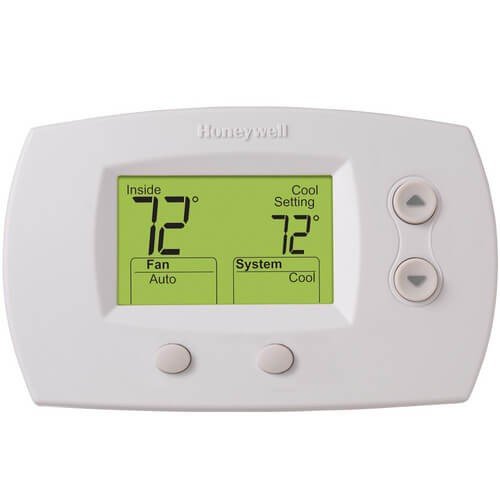
Knowing that First Alert is associated with Honeywell (via Honeywell Home) also adds confidence in its reliability. Honeywell Home has been making trusted home devices for decades. Ive seen dozens of this thermostat over the last 20 years:
Best Features I Noticed Right Away
The setup process through the First Alert app is surprisingly smooth. I downloaded it in advance, so once I pulled the battery tab and pressed the button, the app walked me through each step. It even explained what the LED light colors meant so I was never guessing.
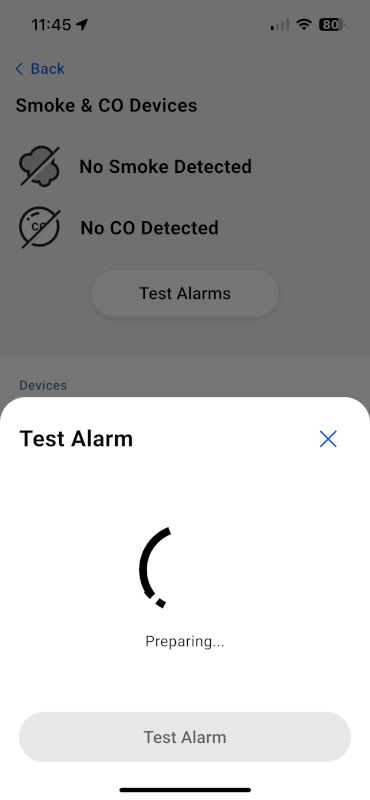
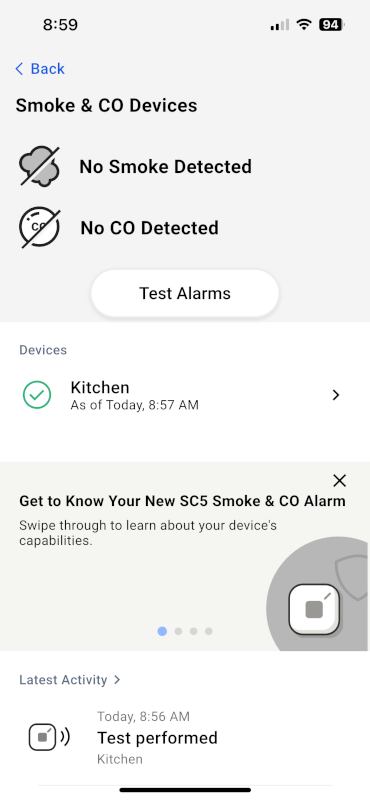
My favorite feature is the test mode in the app. With my old detectors, testing meant standing on a chair and pressing a button while getting blasted with a piercing alarm. The SC5’s app test gives a countdown, runs through smoke, carbon monoxide, and interconnect checks, and uses voice alerts instead of just noise. It is still loud enough to get your attention, but not enough to leave your ears ringing.
The lithium backup battery is another win. No more “low battery” chirps in the middle of the night, and no yearly reminder to swap batteries. It is built in, rechargeable, and should last the entire ten-year life of the alarm.

Any Downsides?
The biggest limitation I found is brand compatibility. Most major smoke detector brands, including Kidde and First Alert, use different wiring and signaling methods. This means their interconnect features will not work together. One interesting point though, Nest Protect Smoke and CO alarms. So if you have a few of thoseinstalled, these are a great replacement or addition.
Interconnect is one of the more valuable safety features in a home. When one detector senses smoke or carbon monoxide, every connected detector in the house sounds the alarm. It is especially important in larger homes or for anyone who might not hear an alarm in another room.
Since my home is wired with Kidde detectors (one of their biggest competitors in the space), the SC5 cannot join that network. It still works perfectly as a standalone smart alarm, but it will not trigger the rest of the detectors, and they will not trigger it. If you are replacing all of your alarms, this is not an issue. But if you are mixing brands like I am, you lose that networked coverage.
In my case, I put the SC5 in the kitchen partly because of this. When cooking sets off a little smoke, I do not need the entire house and my dog joining in on the alert.
How I Installed the First Alert SC5
Installing the SC5 is straightforward, but a little preparation goes a long way. Here is exactly how I swapped my old Kidde alarm for the new First Alert model.
Step 1: Power Down Safely
Cut power at the breaker panel before you touch the alarm. This part can be trickier than it sounds. My kitchen detector turned out to be connected to the bedroom breaker next to the kitchen, not the kitchen circuit itself. It took a few tries to find the right one.

If you are unsure, or you do not want to play “breaker bingo”, use a voltage tester pen like this one to confirm the wires are not live. I keep one in my toolbox because finding out you have power the hard way is not fun.
Step 2: Remove the Old Alarm
Twist the old alarm counterclockwise to detach it from its mounting plate. Unplug the wiring connector from the back. Some older alarms may feel stuck; a gentle wiggle usually frees them.
Step 3: Verify No Power
Even after flipping the breaker, double-check with the voltage tester. My surprise wiring situation is a good example of why. The wrong breaker can leave your detector fully powered even when you think it is off. Testing takes ten seconds and gives peace of mind.
Step 4: Swap the Wiring Connector
First Alert uses a different plug than Kidde. Remove the old connector by unscrewing the wire nuts, then attach the SC5 connector using the included wire nuts. Match wire colors exactly, usually black to black, white to white, and yellow if present for interconnect.
Before going any further, grab a marker and write your install date on the back of the new alarm. The SC5 has a ten-year warranty, and that date will make any future replacement much easier.
[IMAGE: writing install date on back of alarm]
Step 5: Install the New Mounting Plate
The SC5 plate matched my existing screw holes, so I reused the screws already in the ceiling. If yours do not line up, use the ones included in the box. Tighten until snug, but do not overtighten and crack the plastic.

Step 6: Pair the Alarm with the App
Pull the safety tab on the side to activate the battery. The SC5 powers on instantly and announces what to do next. Press the front button to start pairing.
The First Alert app walks you through:
- Scanning the QR code on the alarm or in the manual
- Connecting to your home Wi-Fi
- Naming the device and setting its location such as kitchen, bedroom, etc.

What I liked most is the app does not just pair the alarm. It also includes clear installation steps with pictures, including how to remove an old detector. If this is your first swap, those extra visuals make a big difference.
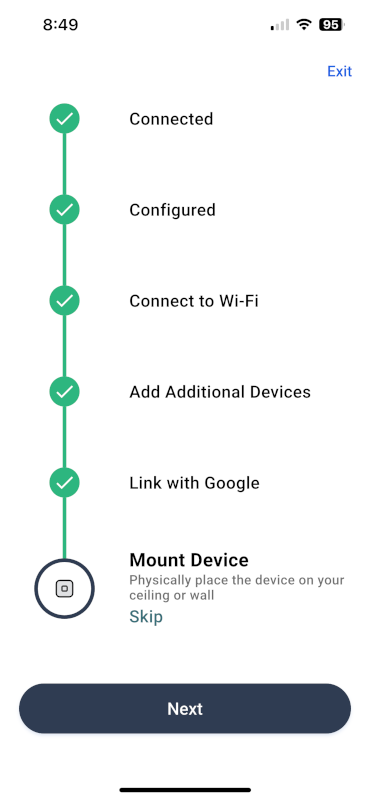
I synced mine before putting it on the ceiling, which made Wi-Fi connection easier and meant I was not trying to type my password while balancing on a ladder.
Step 7: Mount and Connect
Plug the connector into the back of the SC5, tuck the wires neatly into the ceiling box, and twist the alarm clockwise onto the plate until it locks in place.

Step 8: Run a Full Test
Open the app and start a test. The SC5 walks you through smoke, carbon monoxide, and interconnect checks with voice guidance and LED color changes. It is a much calmer experience than my old alarms, which blasted me with noise the instant I pressed the button.
Living With the SC5
I installed the SC5 in my kitchen, where my old Kidde alarm had a habit of panicking at the slightest hint of toast getting too crispy. That would usually set off the rest of the house, plus the dog, in a full chorus of chaos.
The SC5 handles things differently. Instead of instantly blasting a full-volume siren, it gives a calm voice warning first. The alarm clearly states that there is smoke in the kitchen and gives you a moment to fix the problem before it wakes the entire neighborhood.
The voice alerts and LED color changes make it much easier to know what is happening without having to decode mysterious beeps. For everyday life, that means fewer false alarms and less stress when cooking gets a little smoky.
One of my biggest surprises was how much quieter the tests are compared to my old alarms. You still know it is working, but you are not left with ringing ears afterward. That alone makes me more likely to test it regularly, which is exactly what you should be doing.
Frequently Asked Questions
Not if they are from a different brand. The SC5 cannot interconnect with alarms from Kidde or other major brands. It works fine as a standalone smart alarm.
Yes, it will still function as a smoke and carbon monoxide detector. However, the app makes setup, testing, and monitoring much easier.
Yes, the SC5 comes with a built-in lithium backup battery that lasts the full 10-year life of the alarm. No need for AA batteries or yearly replacements.
Yes, the SC5 is compatible with Google’s Nest® Protect Alarm. You can use the Nest app to monitor alerts and integrate it with your Nest ecosystem.
Community Feedback
The community is a bit torn on the SC5 so far. Some users on Reddit report setup headaches or the alarm going off at random times, while others say installation was smooth. Check out Michael’s comment below as well for more feedback. My own experience has been positive, but it’s worth knowing results may vary.
Final Thoughts: A Smarter, Calmer Upgrade
The First Alert SC5 costs a bit more than a basic smoke and carbon monoxide alarm (see on Amazon), but the extra features make it worth considering. The voice alerts, LED indicators, and app controls make it much easier to understand what is happening and respond quickly.
For me, the biggest win is the calmer response to everyday kitchen smoke. Not having the entire house blare at me when dinner goes a little wrong is worth the extra cost on its own. The simplified testing process is another bonus. I actually look forward to running checks now instead of dreading the piercing noise.
If you want a smart alarm that adds peace of mind without adding stress, the SC5 is a solid choice. Just remember that it will not interconnect with alarms from other brands, so you may need to plan ahead if whole-house compatibility is important.
I had Nest Protect Smoke/CO2 alarms (11 of them) for 10 years and they performed flawlessly. I especially appreciated the alarm annunciation which indicated which of the alarms detected the smoke/CO2 to save time pinpointing the emergency location in my home. Then Google Nest killed the Nest Protect alarm range and the 10yr life span from my installation expired. The Google recommended replacement was the First Alert SC-5 Smoke/CO2 alarm. I dutifully replaced them all (@$129 each) hardwired with 120VAC using the included wiring adapter.
WHAT UTTER JUNK THE SC-5 ALARM IS compared to the Nest Protect. 90% of the time it goes off is for quite literally no damn reason – false alarms. Tonight it went off twice at 3AM and 4:30AM for ZERO reason. No windows open all day (not pollen), and humidity 43% (not humidity). This has happened multiple times. I have even arrived home to find the alarms blaring for no discernable reason. These alarms are a NIGHTMARE compared to Nest Protect! There is no confidence in the system and my family is getting upset.
1.
@FirstAlert
SC-5 issues false alarms for quite literally no reason, no smoke, no haze, nothing, it just decides to wake the whole house up and ruin everyone’s sleep with a false no Smoke/CO2 condition. Nest Protect NEVER did that in the 10yrs I owned them.
2. The Nest app (phone and browser) was excellent, never a false alarm and one could silence it with the Nest phone app every single time. The
@Residio
app on the other hand is not effective to silence the alarm even while connected to both WiFi and Bluetooth activated on my iPhone. The only method to silence an active alarm is to physically depress the Test/Reset button. This means you have to find something to stand on to reach and silence the alarm on the ceiling and pressing the Test/Reset button. Not so pleasant when you are awakened out of a sound sleep at 3AM! Then, just when you get back to sleep, another false positive 90 minutes later, again for no reason!
3. When Nest Protect alarmed, it would annunciate the location between siren blares.
@FirstAlert
SC-5’s blares the alarm while annunciating the location, meaning, you cannot hear where the location is because you cannot hear the alarm location name annunciated while the alarm is blaring.
4. There are so many false positive alarms that we just assume now that every event it is a false alarm. This means that if there were a real fire, we could not be sure without policing the entire 4 story house. In fact it is so common the
@firstalert
@resideo
app has become “the boy who cried “Wolf!”! (Lawsuit: if there is a fire but we are being conditioned to ignore it because of incessant false alarms).
5. As a lower priority, the motion activated “night light” was a wonderful Nest Protect feature. If one gets out of bed at night, the Nest Protect would light the way. Sadly, the
@FirstAlert
did not attend to this feature, they stripped that useful offer requirement.
I don’t know which engineering team developed the Google SC-5 integration but obviously they did not replicate the sensible design of the Nest Protect, it’s not even close. In fact, I am not even sure qualified experts even reviewed the system design for feature comparison with the Nest Protect, much less the reliability of the Nest Protect and the confidence it inspired.
I may also be speaking for a lot of other sleepless and very angry customers using the same system.
6 months in and I already hate it and have low confidence in the system.
Thanks for the time and the feedback Michael. I updated the article to have readers take a look at your comment before making any decisions too.