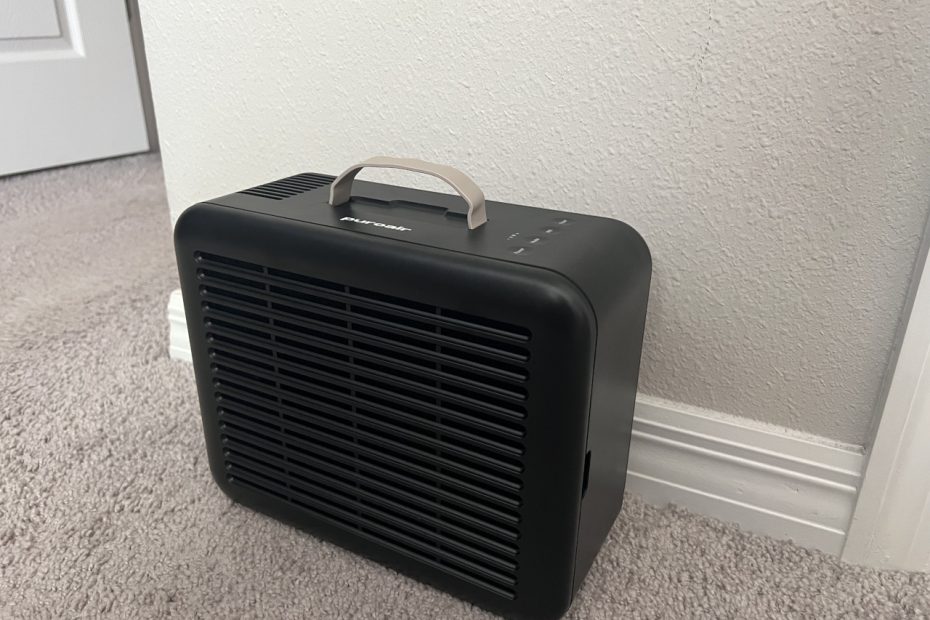

A purifier doesn’t need to dominate a room to help. In Florida, pollen and humidity make indoor air worth considering. But a large purifier can feel like overkill sometimes.
The PuroAir 100i takes a smaller, more portable approach. It has a built-in handle, simple controls, and app scheduling. Amazon deals can also make it much cheaper than the 130i.
One bedroom catch: Sleep Mode leaves all indicator lights fully lit. That could matter if you prefer a completely dark bedroom. I’ll cover that trade-off, along with setup and everyday use.
If you’ve already read my PuroAir 130i review, you’ll recognize several features. The 100i offers a similar app experience in a smaller package. Let’s see where it makes the most sense.
Meet the PuroAir 100i Smart Air Purifier
PuroAir makes air purifiers for different room sizes. Its lineup combines air filtration with convenient smart home features.
The PuroAir 100i uses a three-layer filtration system. A pre-filter catches larger debris, including hair and dust. The HEPA layer captures fine airborne particles, including pollen. An activated carbon layer helps reduce certain odors and gases.
The 100i also connects to Wi-Fi through the PuroAir app. You can adjust settings and create schedules from your phone. It also supports Amazon Alexa and Google Home.
PuroAir rates the 100i for rooms up to 550 square feet. That makes it worth considering for bedrooms and home offices.
You can learn more on the official PuroAir website. You can also check the PuroAir 100i on Amazon.
Unboxing the PuroAir 100i
The first thing I noticed was its compact design. Compared with the 130i, the 100i feels easier to move. A handle on top makes carrying it especially convenient.
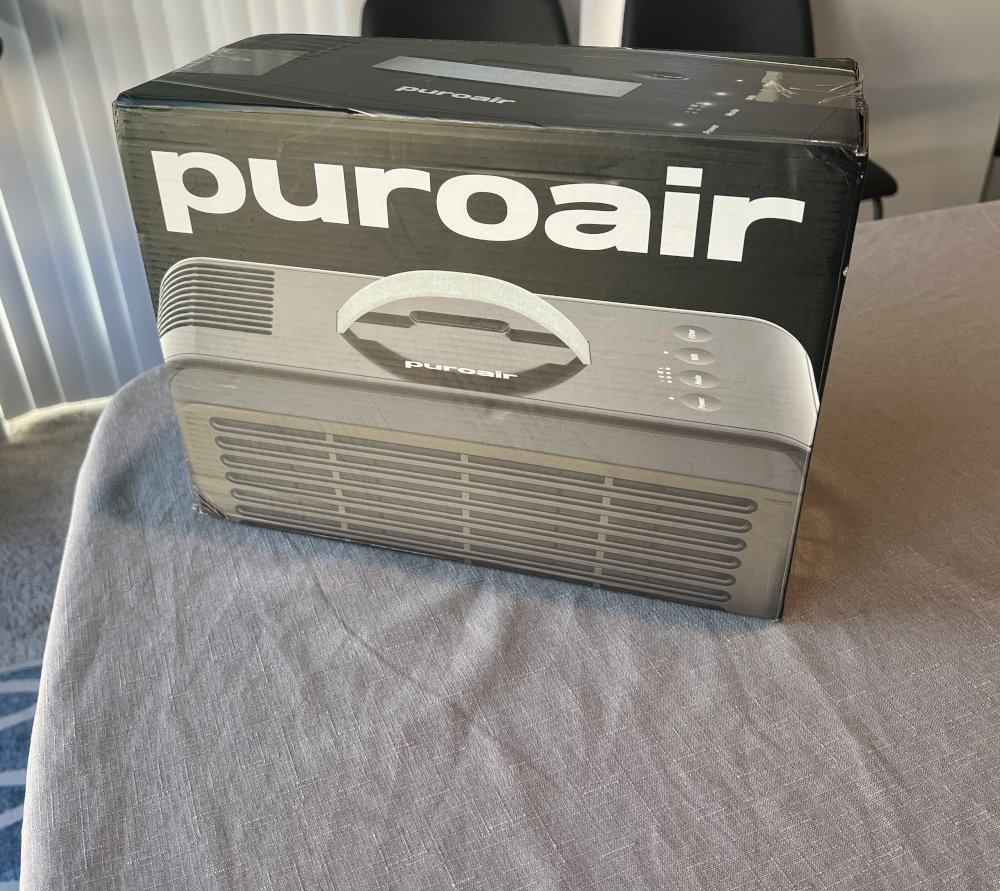
The handle is a simple but useful addition. You can move the purifier between rooms without much effort. That makes it practical for changing needs around the house.
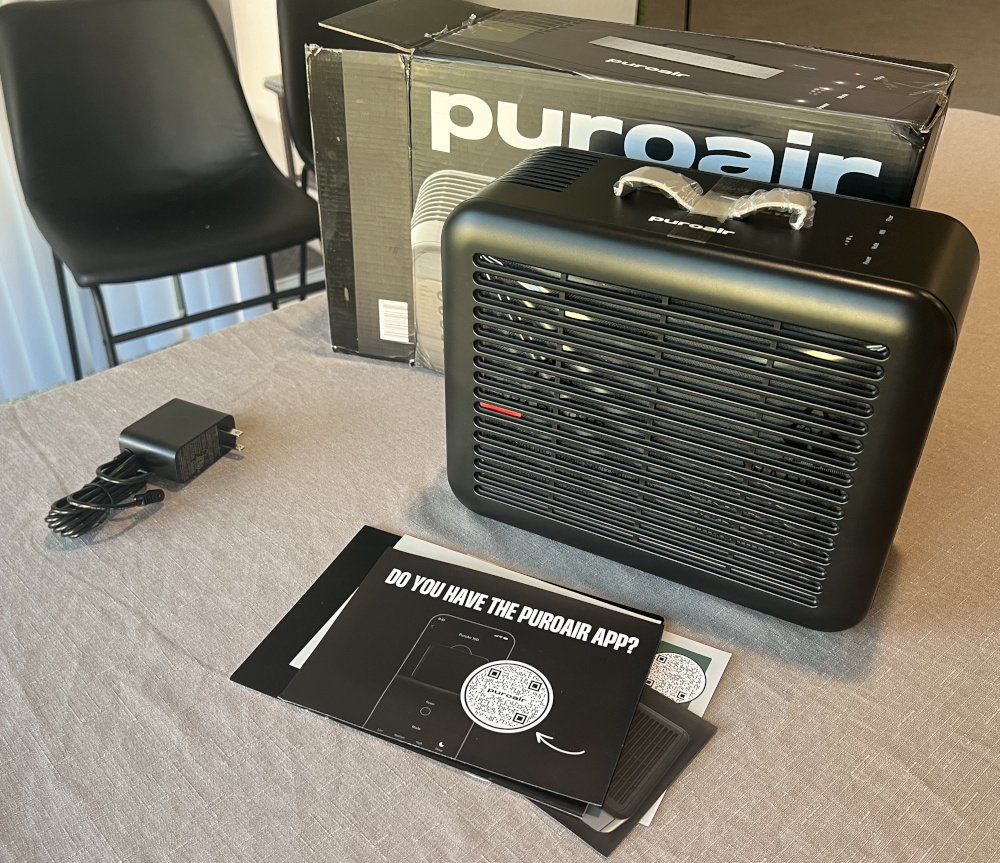
The Filter Compartment Is Easy to Open
The filter compartment uses two magnetic clasps. They hold the cover in place without complicated fasteners. Opening the compartment is quick and straightforward.
After unboxing, you’ll find a red string attached to the filter. Open the compartment and remove the filter carefully. You’ll need to unwrap it before installing it.
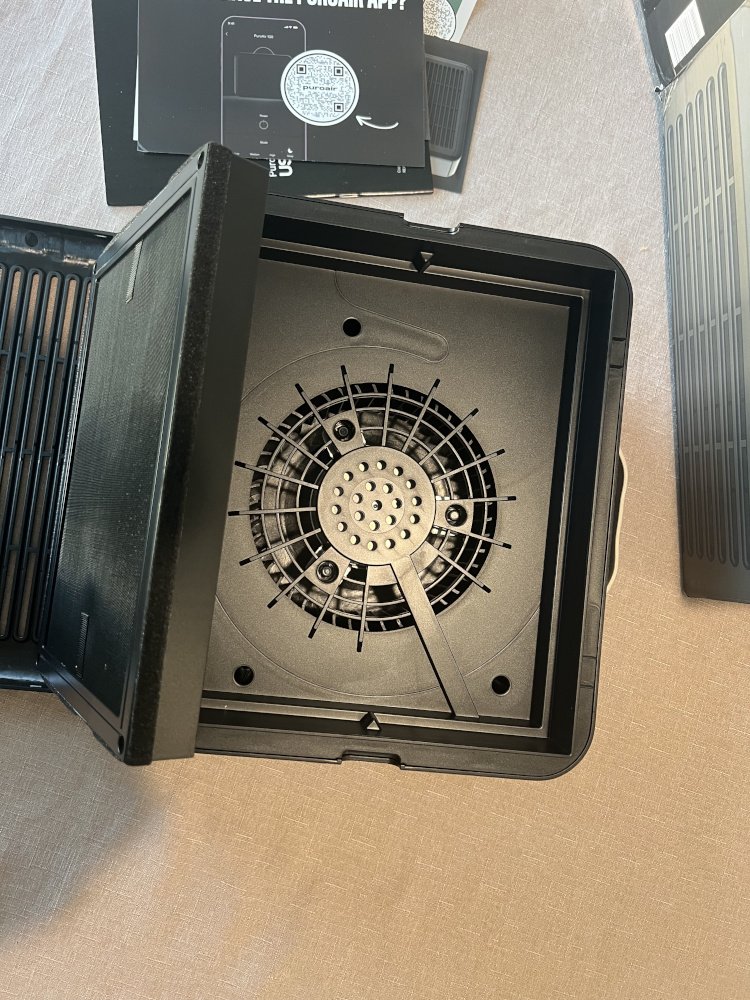
The filter only fits correctly in one orientation. Notches help guide it into the right position. I appreciate that detail because installation feels almost foolproof.
Remember to remove the filter’s packaging before use. Check that the filter sits correctly before closing the compartment.
Simple Design and Physical Controls
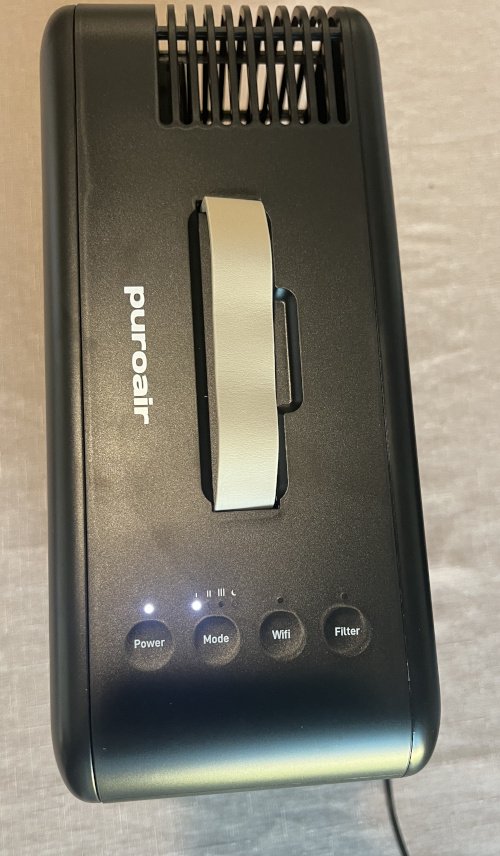
The PuroAir 100i keeps its on-device controls straightforward. Four touch buttons sit on top of the purifier. Four indicator lights show important information.
The controls cover four basic functions:
- Power: Turn the purifier on or off.
- Wi-Fi: Check its wireless connection status.
- Fan speed: Adjust how the purifier runs.
- Filter change: Check when the filter needs replacing.
The layout is easier to understand than the 130i’s interface. You don’t need to navigate a more involved touchscreen. The most important controls are right on top.
One expected omission is a physical remote. You can use the buttons for quick adjustments. The app provides more convenient control from elsewhere.
Setting Up the PuroAir 100i
Getting started was quick and uncomplicated. First, remove the filter and unwrap its protective packaging. Reinstall it using the compartment’s alignment notches.
Close the cover and place the purifier where you want it. Leave enough space around the unit for proper airflow. Then connect the power and turn it on.
You’ll need the PuroAir app to finish connecting the purifier. Follow the instructions to connect it to Wi-Fi. My connection process was quick and painless.
The purifier also needed a software update during setup. Fortunately, the update took about one minute.
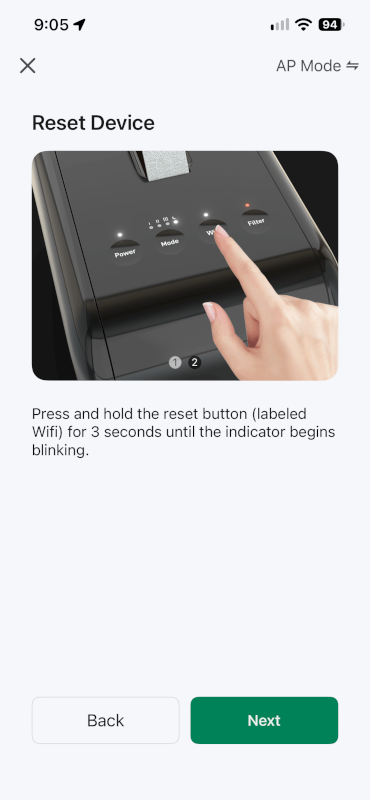
Once setup finishes, the purifier is ready to use. The next step is creating a schedule that fits your routine.
The PuroAir App Is Still a Major Highlight
The app experience is one reason I like PuroAir. The 100i keeps the same convenient approach found on the 130i. You get smart controls without needing to learn a complicated system.
Easy Scheduling From Your Phone
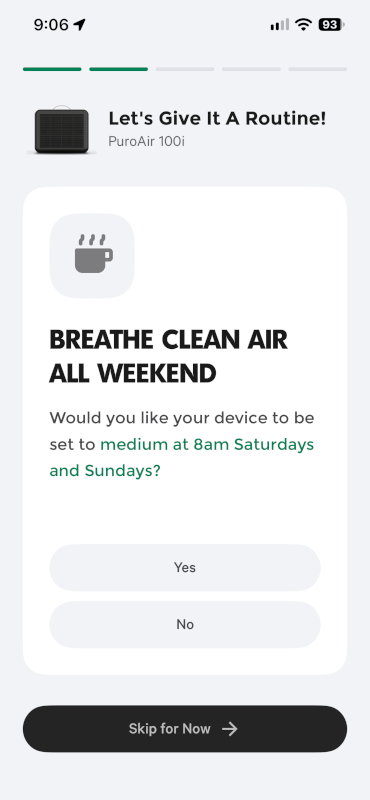
Setting up a schedule is a breeze. The app helps you organize operation around your daily routine. You can choose modes for different parts of the day.
For example, quieter operation makes sense while you’re sleeping. Different settings may suit working hours or busier periods. The schedule handles those changes automatically.
I like being able to set things up once. Afterward, the purifier can follow that daily routine. You won’t need to adjust the fan constantly.
Alexa Adds Another Way to Control It
The PuroAir 100i also works with Amazon Alexa. I connected it to my Echo without much trouble. Now I can control the fan using voice commands.
That’s handy when my phone isn’t nearby. It also fits naturally into an existing Alexa smart home. Google Home support gives users another compatible option.
The app remains the main place for scheduling. Alexa adds convenient voice control for quick adjustments.
One Catch: Sleep Mode Leaves the Lights On
The PuroAir 100i has one drawback worth considering. Enabling Sleep Mode doesn’t dim the indicator lights. All four lights remain illuminated at full brightness.
That could be distracting in a dark bedroom. Some people won’t mind the extra light. Others prefer their sleeping space completely dark.
The difference stands out when compared with the PuroAir 130i. Its display dims by roughly 80 percent in Sleep Mode. The 100i doesn’t offer the same nighttime lighting behavior.
That doesn’t make the 100i a bad bedroom purifier. However, consider its lights before placing it beside your bed. A home office or another room may avoid the issue entirely.
If nighttime darkness matters to you, compare both models carefully. My PuroAir 130i review covers its display in more detail.
Where the PuroAir 100i Makes the Most Sense
The smaller design is the 100i’s biggest practical advantage. The handle makes it easy to move between spaces. Its coverage rating also suits smaller rooms.
A Good Fit for Bedrooms and Home Offices
I’d consider the 100i for spaces like these:
- Home offices: Keep it nearby while working.
- Smaller bedrooms: Add filtration without a bulky unit.
- Personal spaces: Move it when your needs change.
- Smaller rooms: Match the purifier to the space.
The best location depends on your room layout. Furniture and airflow can affect how well air circulates. A purifier’s rated coverage doesn’t guarantee identical results everywhere.
When the PuroAir 130i Makes More Sense
I’d consider the 130i for larger spaces. Its higher rated coverage gives you more room to work with. Its dimmed display also suits nighttime use better.
The choice comes down to your priorities. The 100i is easier to carry and may cost less. The 130i offers greater coverage and a better-dimmed display.
You can read my full PuroAir 130i review here.
PuroAir 100i Pricing and Replacement Filter Costs
The purchase price is one of the 100i’s strongest advantages. During my price check, Amazon offered a substantial discount. Depending on the promotion, savings can approach half the 130i’s price.
Check the current PuroAir 100i price on Amazon.
Amazon prices change, so compare both models before buying. The size of the discount can change the recommendation.
If the savings are substantial, the 100i makes sense. It’s a practical choice for smaller rooms and offices. However, a small price gap changes the calculation.
When the prices are close, I’d consider upgrading. The 130i offers more rated coverage and better-dimmed display lighting. Those benefits may justify paying a little more.
Replacement Filters Cost About the Same
Unfortunately, the smaller purifier doesn’t save much on filters. The PuroAir 100i replacement filter costs around $35. That’s roughly the same as the 130i’s replacement filter.
You can buy PuroAir 100i replacement filters on Amazon. They’re also available through the official PuroAir website.
PuroAir recommends replacing the filter about every 90 days. Actual timing can depend on usage and air quality. Check the manufacturer’s guidance for your specific filter.
Remember to include replacement filters in your budget. A lower purchase price doesn’t guarantee lower long-term costs.
Frequently Asked Questions
The PuroAir 100i is rated for rooms up to 550 square feet. Actual performance depends on room layout and airflow. It’s a practical option for many bedrooms and offices.
Yes, the PuroAir 100i supports Amazon Alexa and Google Home. I connected mine to an Echo for voice control. You can also use the app for schedules and adjustments.
No, the four indicator lights remain fully illuminated in Sleep Mode. Light-sensitive sleepers may find them distracting. Consider placement carefully if using it in a bedroom.
Final Verdict: Is the PuroAir 100i Worth It?
The PuroAir 100i is a solid option for smaller rooms. Its compact design and handle make moving it easy. The physical controls are simple and easy to understand.
The app is another strong point. Scheduling works well, and Alexa voice control is convenient. Those smart features make everyday use feel straightforward.
The bright indicator lights are its main drawback. Replacement filters also cost about the same as the larger model.
For a smaller room, the 100i deserves consideration. The key is finding it at a meaningful discount. When the prices get closer, the 130i becomes more tempting.
My recommendation: Choose the 100i when savings matter and coverage fits. Consider the 130i when prices are close. The extra coverage and dimmed display may be worth upgrading for.