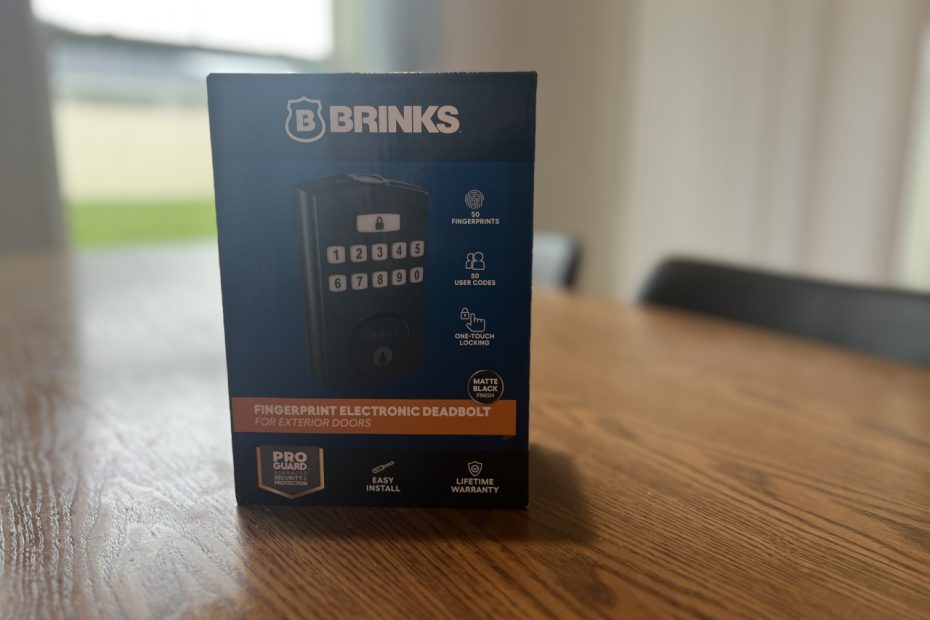

While most people were stocking up on water and boarding up windows ahead of Hurricane Milton, I took a different approach to hurricane prep: installing the Brinks Fingerprint & Keypad Electronic Door Lock. Yep, while others were grabbing canned goods, I was grabbing a screwdriver.
Brinks had just sent me their new door lock to test, and what better time to give it a whirl than with a Category 3 storm on the way? I mean, sure, most people focus on hunkering down. But me? I install smart home gadgets while waiting for the eye of the storm. Priorities, right?

So, here’s my take on Brinks’ latest “pseudo-smart” lock—complete with personal installation hiccups, high winds, and more soda than I’d like to admit.
Spoiler: I did get it installed before the storm hit…barely.
Key Features and Who This Lock is For
When it comes to smart locks, the Brinks Fingerprint & Keypad Electronic Door Lock offers a “pseudo-smart” experience—and that’s a selling point. It doesn’t rely on Wi-Fi, which means you can count on it even when the power goes out (looking at you, Hurricane Milton). Despite being off the grid, it still packs plenty of modern conveniences that make everyday access a breeze.
Key Features at a Glance
Fingerprint & Keypad Access:
No more lost keys or panicked phone calls from family members. This lock stores up to 50 fingerprints and 50 user codes, making it ideal for families, Airbnb hosts, or anyone looking for easier, key-free access.
Security First:
It comes with ANSI Grade 3 certification, an anti-pry shield, and anti-bump technology, all designed to keep your home secure from both intruders and nosy neighbors.
Sounds fancy, but what does ANSI Grade 3 actually mean? I got you covered.
Auto-Lock:
If you’ve got kids or housemates who forget to lock up, the auto-lock feature kicks in after 1 to 99 seconds, making sure your home is secure—even if your brain isn’t fully awake.
Battery-Powered:
No wires, no problem. It runs on 4 AA batteries (not included), which should last up to 24 months. Time will tell if it really holds, but so far, so good.

Who Is This Lock For?
Families:
Tired of the kids misplacing keys or leaving the door unlocked? The fingerprint reader saves the day. Plus, the auto-lock feature means no more “Did I lock the door?” moments.
This hits home (pun intended) for me as I have a four-year-old who knows how to open the front door in order to wave to the trash truck, but often leaves it left unlocked for the rest of the day. Now I don’t have to worry if my front door is unlocked or not.
Airbnb Hosts:
Need to add and remove user codes as guests rotate in and out? This lock makes managing access easy without the hassle of exchanging keys.
Small Businesses:
Perfect for offices where security matters, but you don’t need a full-blown smart system. The fingerprint and code options give you flexible access for employees without the complexity of enterprise solutions.
Who This Lock Is Not For
While this lock hits a lot of the right notes, it’s not for everyone:
If You Want Real-Time Notifications:
Unlike fully connected smart locks, this one doesn’t send alerts when someone enters or exits. If phone notifications for every lock/unlock event are a must, this isn’t your best option.
If You Want to Unlock Your Door from a Smartphone:
No Wi-Fi means no remote control. You can’t unlock it with an app or ask Alexa, Siri, or Google Assistant to let someone in. If remote access is non-negotiable, look elsewhere.
If You Don’t Want to Deal with Programming:
No Wi-Fi also means you can’t add or remove fingerprints or codes on the fly, or remotely. You’ll need direct access to the lock, and know the exact sequence of buttons to press to add or remove them.
If you’re looking for a smart door lock, check out this article instead.
Installation Overview and My Hurricane-Proof Process
Now, let’s talk about installing this thing. I’ll admit, I’m not your typical hurricane prepper—while others were grabbing batteries and boarding up windows, I was standing at my front door, screwdriver in hand, installing the Brinks Fingerprint & Keypad Electronic Door Lock. And let’s just say, I ran into a couple of bumps along the way (not just from the weather).
Installation Overview
Tools Required: Just a Phillips screwdriver. No power tools needed, making this ideal for those of us who aren’t master carpenters.
Time to Install: About 1.5 hours for me, but that’s mostly because I have a knack for finding ways to complicate simple tasks—like accidentally installing the lock backward. (Yes, that happened.)
Included in the Box:

- The lock (obviously)
- 2 physical keys
- Strike plate replacements (which I ended up reusing my old one)
- A manual that you don’t want to lose
Main Hurdle:
Lining up the screws to attach the front and back plates took a few tries. Not difficult, just tedious. Aside from that, it was smooth sailing.
Quirks I Ran Into
Strike Plate Doesn’t Fit: I couldn’t get the provided strike plate to fit my doorframe, so I just used the old one. Problem solved, and the lock still works like a charm.
Failed Sync: After installing the batteries, I got a red blinking light (3 blinks), signaling a failed sync. But after a quick factory reset (with a SIM card tool, of all things), it worked perfectly.
Accidentally Installed it Backward: Yep, I put the lock on backward the first time. Hurricane brain, maybe? It was an easy fix, but I’m still laughing at myself for that one.
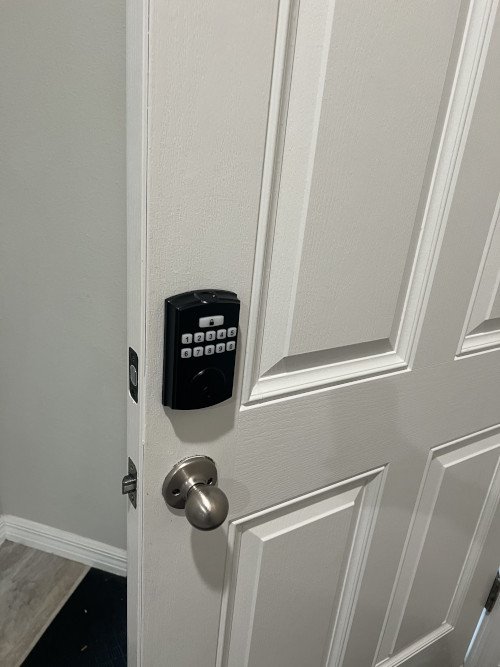
Overall, the hardest part of this install was… well, actually nothing was too hard. Even with my hurricane distractions, it was mostly smooth sailing. If I could handle it while Milton was brewing outside, you can definitely tackle this on a calm Saturday afternoon.
Programming the Lock: Fingerprints, Codes, and a Bit of Patience
Once the lock was installed, programming it was easier than I expected, especially considering I was half-watching hurricane updates on TV. Here’s how it went down.
What Can You Program?
- Up to 50 Fingerprints: Perfect if you’ve got a big family or are running an Airbnb. You can even save the same fingerprint twice for the paranoid among us.
- Up to 50 User Codes: Handy for permanent or temporary access. Airbnb hosts and small businesses will appreciate how easy it is to add and delete codes.
- Single-Use Codes: Need to let someone in just once—like your neighbor sharing your hurricane snacks? These codes expire after use.
Minor Annoyances
- SIM Card Tool Reset: If you ever need to reset the lock, you’ll need a SIM card ejector tool (yes, the one from your phone). There’s a tiny hole at the bottom of the lock for this purpose. It feels a bit too techy for a door lock, but at least it works reliably.
- Failed Sync: After my first attempt at programming, the lock flashed red three times, signaling a failed sync. A quick factory reset solved the issue, and everything worked fine afterward.
In total, the programming took about 20 minutes. Not bad, considering the hurricane distraction and my usual luck with tech devices. All in all, it’s a straightforward process that I know anyone can manage.
And worst case, if you do lose the manual, you can get a digital copy from Bink.
Frequently Asked Questions
Does the Brinks Fingerprint & Keypad Electronic Door Lock have wireless connectivity?
No, it operates without Wi-Fi, making it less prone to hacking but lacking smart features like remote access.
Can I receive notifications when the lock is used?
Unfortunately, no. If you need alerts for every lock/unlock, this lock isn’t for you.
Can I unlock the door remotely with my smartphone or voice assistant?
This lock doesn’t support remote unlocking via smartphone or voice assistants like Alexa or Siri.
How many codes and fingerprints can I store?
You can store up to 50 user codes and 50 fingerprints. Good luck keeping all those codes straight without a real interface though. You’ll need a spreadsheet once you get past 5 or so.
What if I forget the programming code?
If you forget the programming code, you’ll need to refer to the manual to reset the lock. Don’t lose the manual!
How does the fingerprint reader work in practice?
The fingerprint reader is quick and responsive. It’s a particularly handy feature for kids who might otherwise get locked out. For instance, I’ve already got my four-year-old’s fingerprint saved for this exact reason.
Conclusion: A Solid Choice for Secure, Simple Access
The Brinks Fingerprint & Keypad Electronic Door Lock is perfect for anyone who prioritizes reliability and ease of use over fully integrated smart home features. With its robust security, straightforward access options, and the ability to function without Wi-Fi, it’s well-suited for families, small businesses, and Airbnb hosts.

And let’s be honest—if I could install it during a Category 3 hurricane all while wondering if I installed it backward (I did), then you can definitely tackle it on a regular afternoon. It’s dependable, easy to set up, and provides peace of mind—whether or not there’s a storm brewing outside.