
I put off testing my home’s radon levels for years.
Not because I didn’t care about my family’s health. But because traditional radon tests felt like a science project I’d never finish.
Traditional radon testing is a hassle: Order a kit, wait for it to arrive, mail it back to a lab, wait weeks for results, and wonder if you did it right.
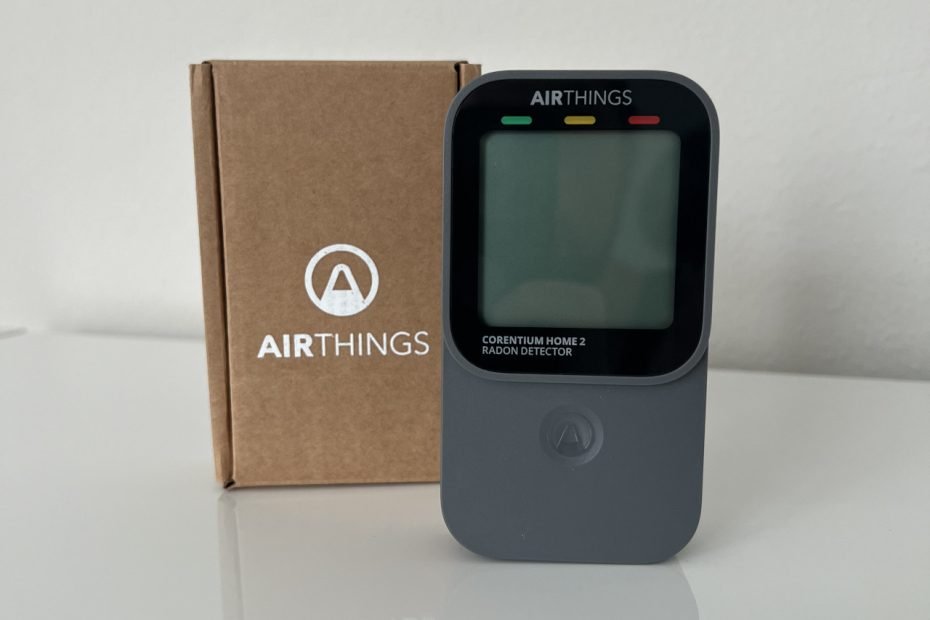
The Corentium Home 2 by Airthings changes everything. No more waiting for lab results. No complicated setup. Just instant readings from a digital radon detector that actually makes sense. Check it out on Amazon.
I’ve been testing this device in my own home for real readings and real experience. This isn’t generic product copy – it’s a hands-on guide from someone who finally found radon testing that works.
What You’ll Learn
By the end of this review, you’ll know:
✅ Exactly what comes in the box
✅ How long setup really takes (hint: under 5 minutes)
✅ What those numbers on the display actually mean
✅ Whether it’s worth the investment over $15 test strips
✅ The one annoying thing about the app
Ready to take control of your home’s air quality? Let’s dive in.
Looking for the basics first? Check out our guide: Is Radon in Your Home? Here’s How to Find Out before continuing.
What You Get Out of the Box
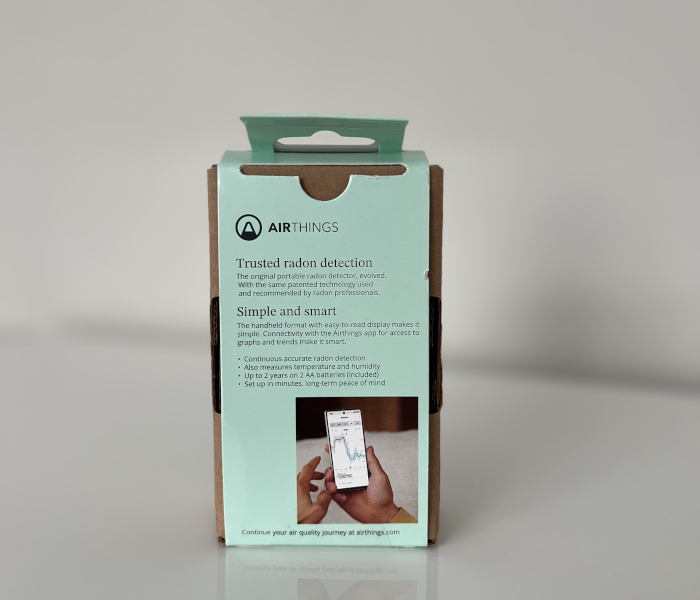
Opening the Corentium Home 2 feels refreshingly simple. No excess packaging. No confusing instruction manuals. Just the essentials.
Here’s Everything Inside:
The Device Itself
- Compact size (fits in your palm)
- Clean, modern design with easy-to-read display
- Surprisingly lightweight for something this capable
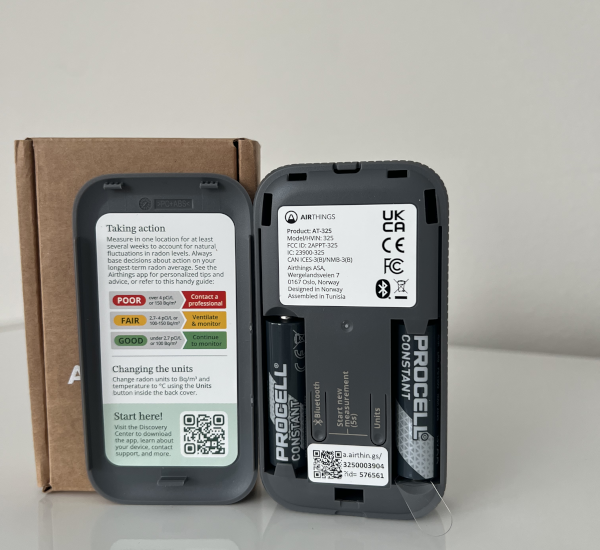
Two AA Batteries (Already Included): This is a huge upgrade from the original Corentium. The V1 needed three batteries and died faster. The Home 2 runs on just two batteries for 2+ years – that’s 50% longer battery life.
Quick Start Guide with QR Code Gone are the days of thick manuals. Scan the QR code, download the app, and you’re ready to go.
First Impressions
The build quality impressed me immediately. This isn’t some cheap plastic gadget. The display is clear and readable from across the room. The buttons feel responsive, not mushy.
The display is a major upgrade too. Not only are the readings much clearer than the original, but there’s a new radon level indicator that’s genius. It gives you a quick visual cue about your radon levels at a glance – no need to remember what numbers are good or bad.
Size comparison: About the size of a small alarm clock. Fits anywhere without looking out of place.
Weight: Light enough to move between rooms easily, but solid enough to feel well-made.
Bottom line? Airthings clearly learned from the first version. Everything about the unboxing experience says “we made this simpler.”
Setup: Easier Than Setting a Digital Clock
I timed the entire setup process. 4 minutes and 23 seconds. That includes downloading the app.
Seriously, this is the kind of setup experience that makes you wonder why other devices are so complicated.
Physical Setup (Under 2 Minutes)
Pop in the two AA batteries. The battery compartment opens easily with clear + and – markings. No tiny screws or hunting around your junk drawer since batteries are included.
The device boots up immediately and shows initial readings within seconds.
App Connection (Another 2 Minutes)
Download the Airthings app and scan the QR code on your quick start guide. It opens directly to the right setup screen with no hunting through menus.
Bluetooth pairing happens automatically. The app finds your device instantly with one-tap connection.
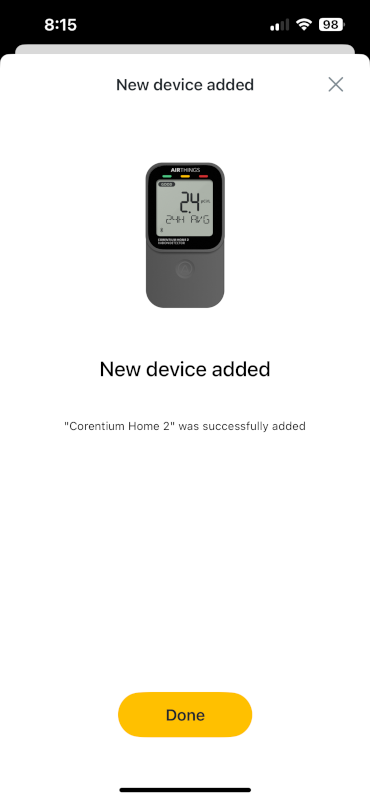
Account Setup and Warranty Registration
Create your Airthings account with basic info (name, email, location) – takes about 30 seconds. Then register for the 5-year warranty by confirming your purchase date and device serial number. It’s required, but worth it for peace of mind.
Placement Tips
Best locations: Lowest lived-in level of your home, away from windows and vents, not in bathrooms or kitchens. Keep it at least 3 feet from exterior walls for accurate readings.
Wall mounting is possible but tricky. You’ll need to thread string through a small hook inside the battery compartment. It works, but feels like an afterthought in the design.
Initial Calibration
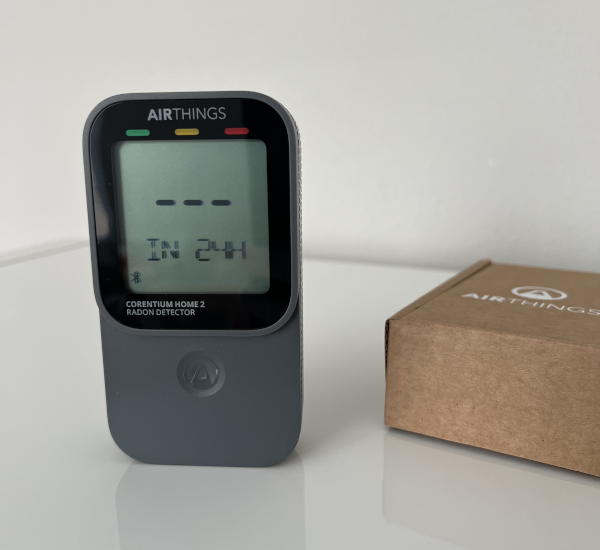
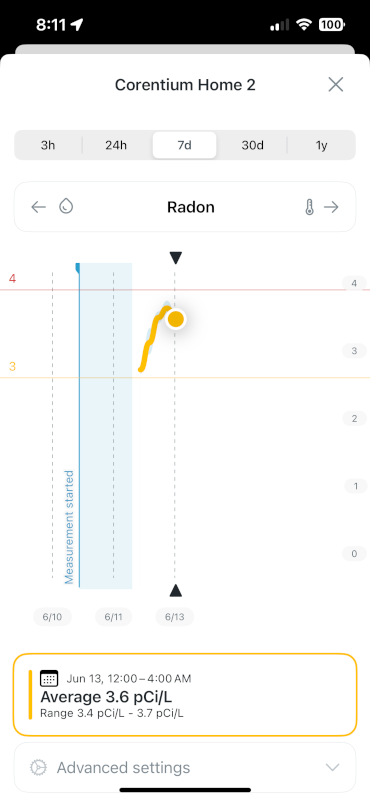
Once placed, the device starts collecting data immediately. You’ll see initial readings within 24 hours, but don’t make any decisions based on early numbers.
Wait at least 7 days for reliable baseline data. Radon levels fluctuate naturally throughout the day and week. Personally I plan on waiting a month before acting on any readings.
The setup experience alone convinced me this is the radon test device most homeowners have been waiting for. No PhD in physics required.
What the Numbers Actually Mean
The Corentium Home 2 display shows three key readings: radon levels, temperature, and humidity. But if you’re like most people, you’re staring at these numbers wondering “Is this good or bad?”
Radon Levels: The Main Event
The big number is your radon concentration. It’s measured in either pCi/L (picocuries per liter) or Bq/m³ (becquerels per cubic meter). Don’t worry about the science – just know these are the standard units professionals use.
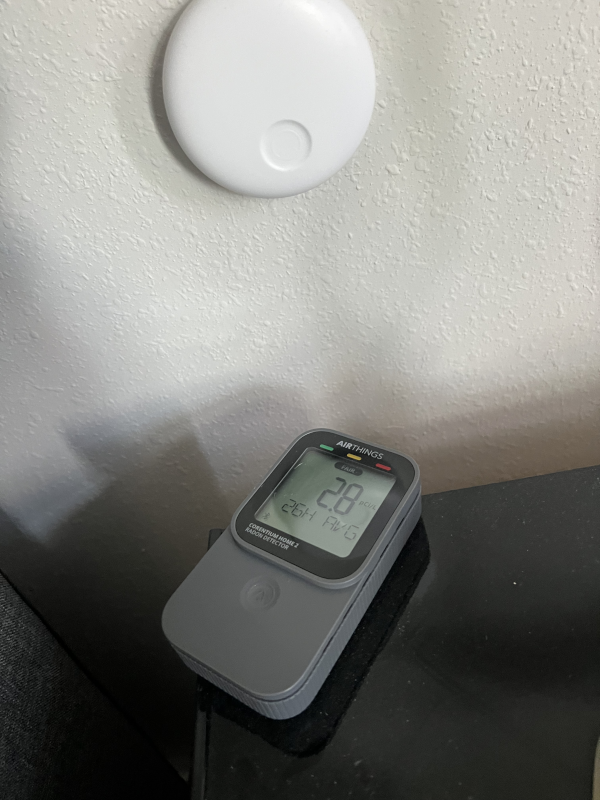
Here’s what matters:
- Below 2 pCi/L (148 Bq/m³): You’re in the clear
- 2-4 pCi/L (148-370 Bq/m³): Consider taking action
- Above 4 pCi/L (370 Bq/m³): Definitely take action
The EPA recommends homes be fixed if the radon level is 2 pCi/L or more, making this the official action threshold for radon mitigation. 4 pCi/L is threshold for poor though. That’s when things are concerning.
The Radon Level Indicator: Your New Best Friend
This is where the Corentium Home 2 really shines. That color-coded indicator next to your radon reading removes all the guesswork:
🟢 Green: Safe levels – breathe easy
🟡 Yellow: Watch zone – keep monitoring
🔴 Red: Action needed – time to address this
Temperature and Humidity: Bonus Features
The Corentium also tracks temperature (switchable between °F and °C) and humidity levels. These aren’t just nice-to-haves – they help you understand your indoor environment better.
Accuracy check: I placed my Corentium right next to my Airthings Wave Enhance, which also has temperature and humidity sensors. Both devices show nearly identical readings, which gives me confidence in the Corentium’s sensor accuracy.
Why this matters: Extreme humidity can affect radon readings. If you’re seeing unusually high radon levels during humid periods, that’s useful context.
Pro tip: You can change units using the small buttons under the battery cover. Press and hold to switch between pCi/L and Bq/m³, or °F and °C.
Reading Timeline: What to Expect
Day 1: Initial numbers appear, but don’t panic or celebrate yet
Week 1: More reliable baseline emerges
Month 1+: True long-term average becomes clear
Personal example: My 24-hour reading showed yellow (in the watch zone). But I’m not panicking or calling mitigation companies yet. I’m waiting for more data before making any decisions.
Important: Radon levels fluctuate naturally. Weather, season, and even how often you open windows affects readings. The device averages everything over time to give you the real picture.
The beauty of a digital radon detector like this? You can watch these trends develop instead of getting one snapshot and wondering if it was accurate.
Why I Trust It Over a $15 Charcoal Test
When you see a $15 radon test kit next to a $150+ digital detector, the price difference is obvious. But after using both methods, there are real differences beyond just convenience.
The Science Behind the Accuracy
Detection method: Alpha spectrometry
Sampling interval: Every 60 minutes
Accuracy: Within 10% when used for 4-7 days
This is the same detection method used by professional radon testing equipment. You’re not getting a “consumer-grade approximation” – you’re getting lab-quality results at home.
Charcoal Test Trade-offs
Single moment in time: Charcoal tests capture radon levels during a specific 2-4 day period. Radon levels naturally fluctuate, so you might get readings that aren’t representative of your long-term exposure.
Timing and shipping factors: The charcoal starts absorbing radon when opened. Mail delays or timing issues can affect accuracy.
One chance to get it right: If placement or timing isn’t perfect, you need to buy another kit and start over.
The Smart Home Advantage
Continuous monitoring means you see patterns, not just snapshots. Radon levels change with weather, seasons, and even how often you open windows.
Instant feedback lets you test different locations in your home. Basement higher than main floor? You’ll know immediately.
Multiple testing rounds with one purchase. After I gather a month of data from my house, I’m sharing this device with family members to test their homes too. Try doing that with disposable test kits.
Professional Testing Costs Add Up
One-time professional test: $150-300
Follow-up testing: Another $150-300
Post-mitigation verification: Another $150-300
Corentium Home 2: One purchase, unlimited testing
The math works even if you only use it twice. But the real value is peace of mind – you can monitor your levels ongoing instead of wondering “what if things changed?”
Real-World Reliability
The EPA requires radon detectors to meet strict accuracy standards. The Corentium Home 2 exceeds these requirements when used properly (4+ days of monitoring).
Bottom line: Both methods work, but they serve different needs. Charcoal tests are fine for a basic screening. The Corentium makes sense if you want ongoing monitoring or plan to test multiple locations.
Downsides?
The Corentium Home 2 has one genuinely annoying limitation: The app only syncs data when you open it and are near the device.
This means no automatic data uploads to the cloud. You have to physically visit the device to get updated readings in the app. I discovered this when I placed the device in my basement and forgot to check the app for a week – I missed several days of trend data.
Luckily though, the device does save historical data, so you get any missed readings during a sync.
This is the same issue I found with the Airthings Wave Enhance – Bluetooth-only connectivity limits the app’s usefulness for long-term monitoring.
Minor Complaints
Wall mounting feels clunky. You need to thread string through a small hook inside the battery compartment. It works, but feels like an afterthought.
Button placement is awkward. The unit selection buttons are hidden under the battery cover.
The sync limitation is genuinely annoying, but it doesn’t affect accuracy. You’ll still get reliable radon readings – you just have to remember to check the app regularly if you want historical data.
Frequently Asked Questions
Yes, it’s accurate within 10% when used for 4-7 days. It uses alpha spectrometry, the same detection method as professional equipment. The EPA requires radon detectors to meet strict accuracy standards, and the Corentium exceeds these requirements.
Absolutely – it’s designed for continuous, lifetime use. Move it between rooms, test seasonally, or monitor after mitigation. I’m planning to test my house for a month, then share it with family members to test their homes too.
You’ll see initial readings within 24 hours, but wait at least 7 days for reliable data. Radon levels fluctuate naturally throughout the day and week. Longer testing periods provide better averages.
Place it on the lowest lived-in level of your home, away from windows and vents. Avoid bathrooms or kitchens where humidity affects readings. Keep it at least 3 feet from exterior walls. For detailed placement tips, check Airthings’ official guide.
Both measure radon concentration – pCi/L (picocuries per liter) is used in the US, while Bq/m³ (becquerels per cubic meter) is the international standard. The EPA action level is 4 pCi/L or 148 Bq/m³. You can switch units using buttons under the battery cover.
Yes, radon is the second leading cause of lung cancer after smoking. It’s a naturally occurring radioactive gas that can accumulate in homes. For more background, read our guide: Is Radon in Your Home? Here’s How to Find Out.
Final Verdict: Worth Every Penny for Peace of Mind
The Corentium Home 2 removes every excuse you have for not testing your home’s radon levels.
No more waiting weeks for lab results, wondering if you did the test correctly, or one-and-done testing that leaves you guessing about long-term trends.
Who Should Buy This
Perfect for: Homeowners who want reliable, ongoing radon monitoring without the complexity of professional-grade equipment.
Ideal if you: Plan to test multiple rooms, share with family members, or want to monitor levels after mitigation work.
Skip it if: You only need a basic screening and don’t mind the limitations of disposable test kits.
The Bottom Line
Yes, it costs more than a $15 charcoal test. But consider what you’re getting:
✅ Professional-grade accuracy (alpha spectrometry detection)
✅ Unlimited testing in multiple locations
✅ Continuous monitoring instead of snapshots
✅ 2+ year battery life with minimal maintenance
✅ Temperature and humidity bonus features
✅ 5-year warranty for peace of mind
The app sync limitation is annoying, but it doesn’t affect the core function – detecting radon accurately.
My Plan Moving Forward
I’m keeping the Corentium in my home for at least a month to establish a solid baseline. Then I’ll share it with family members so they can test their homes too. That’s the kind of flexibility you can’t get with traditional test methods.
For non-technical homeowners who want a reliable digital radon detector, the Corentium Home 2 fits the bill. It makes radon testing as simple as checking your thermostat. Take a look on Amazon.
Ready to get started with radon testing? Check out our foundational guide: Is Radon in Your Home? Here’s How to Find Out